Getting Started with Carry On Together
Loan, truck, training floor, first delivery — a practical first-hour path for solo movers and full co-op crews.
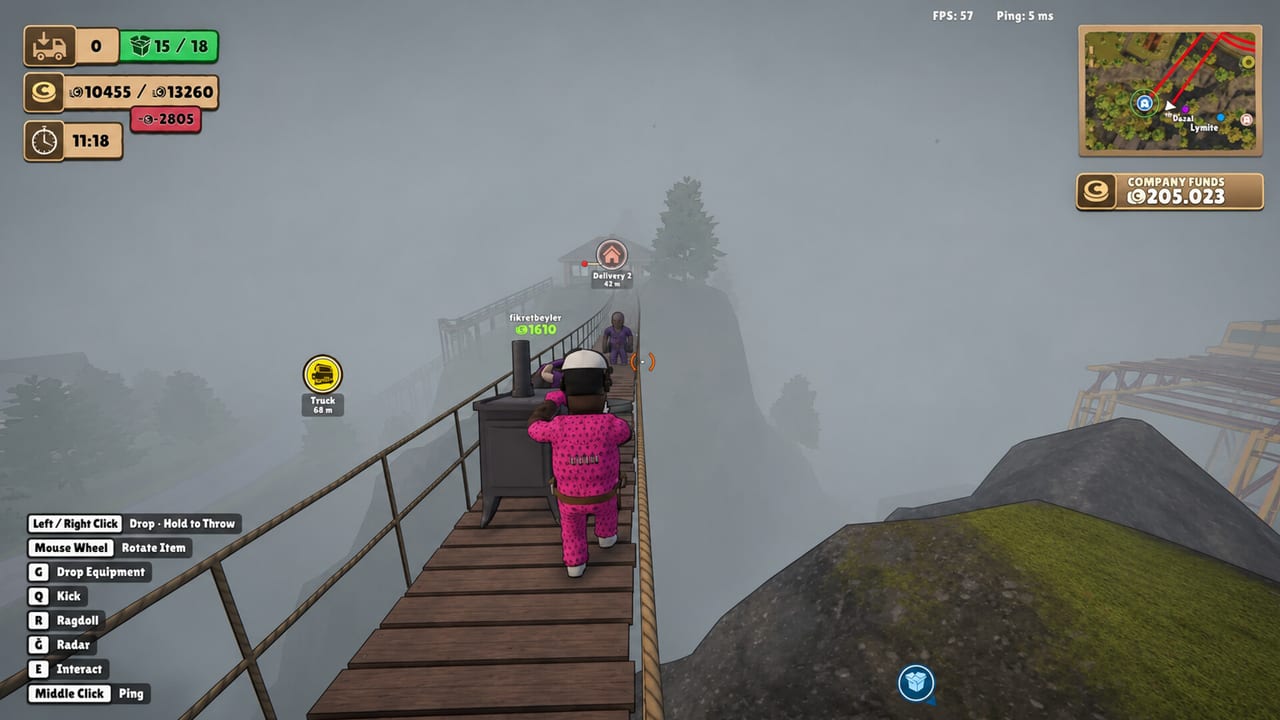
Carry On Together is a physics-based online co-op moving game from Butiq Games (developer) and Red Axe Games (publisher). You run a small delivery company: borrow money, buy a truck, accept jobs, lift furniture with shared physics, load the bed, drive to the destination, unload, get paid after damage and penalties, then upgrade the company for bigger contracts. Steam lists online co-op for up to four players plus single-player, so you can practice alone or invite a full crew.
This guide is the first-hour checklist — from wishlist and demo install through your first completed delivery — with pointers into deeper pages for controls, carrying, driving, and demo scope.
Wishlist the full game and install the demo
The full game is Steam app 4776500. The free demo is Steam app 5338620 and has been available since about 8 October 2026. The Steam store currently lists a planned unlock around 27 November 2026; developers delayed past an earlier 11 November target while waiting on Steam approval. Treat store dates as provisional until the build is live.
Practical opening steps:
- Wishlist Carry On Together on Steam so you get the launch notification.
- Install the free demo from the same store family and confirm your PC meets the published requirements on our system requirements page (minimum roughly Windows 10, Core i5-6600, 8 GB RAM, GTX 970, DirectX 11, 2 GB storage; recommended Windows 11, Core i7-8700, 8 GB RAM, GTX 1070).
- Optionally join the official Discord for patch notes and lobby friends.
- Decide whether your first session is solo practice or a two-to-four player crew — heavy furniture is designed for shared lifts.
Skim the Demo Guide if you want a full list of Demo 1.7 features before you boot in.
The company loop in plain language
Every successful session follows the same spine:
- Take a loan so the company can operate.
- Buy a truck — your mobile cargo bed and the heart of every job.
- Accept a job from the available contracts.
- Lift and carry furniture out of the origin property. Light boxes can be a one-person grip; heavy pieces need two or more players lifting together.
- Load the truck, using the tailgate carefully so items do not bounce out on the first corner.
- Drive to the destination without launching cargo through the cabin.
- Unload and place items, then settle pay: damage reduces earnings and can add repair costs; happier homeowners tip better.
- Upgrade the company and chase larger jobs.
Demo 1.7 removed the time bonus. Do not plan your first hour around speedrunning the clock. Intact furniture and calmer clients pay better than a frantic finish with shattered toilets and angry tips.
Use the Warehouse training area before your first paid job
Demo 1.7 added a training area on the lower floor of the Warehouse. Practice there before you take a live contract:
- Carry boxes at different weights and feel when a one-hand grip is enough versus a two-hand grip.
- Try the pallet jack and other equipment so you are not learning tools mid-job.
- Practice throwing and jumping interactions in a space where mistakes do not anger a homeowner.
- Confirm your preferred input — keyboard and mouse, or a fully supported Xbox or PlayStation controller on PC.
Pair this session with the Controls page so job sheet (J), radar (X), map (M), middle-mouse ping, and truck E tailgate actions are muscle memory before a client is watching.
Hardware stores in the Warehouse and in town sell equipment such as inflatable mats and trampolines. You do not need every gadget on hour one, but knowing the shop exists stops you from improvising dangerous drops later.
Your first real job
When training feels stable:
- Open the job list and pick a contract your crew size can handle. A solo player should avoid the heaviest multi-lifter pieces until they understand geometry; a duo can already share sofas and fridges.
- Travel to the origin property. In Demo 1.7, homeowners greet you and watch the move. You will meet personalities such as Picky Auntie and Easygoing Uncle. Each has preferences; favorite items and wall hits change their mood.
- Clear a path before you lift: open doors, check stair landings, and plan elevator trips if the building has one.
- Lift light items first to open space, then coordinate heavy two-player carries through corridors and stairs. Read How to Carry Together for sync tips, damage rules, and equipment use.
- At the truck, use E at the tailgate to slide cargo in. Pack dense and low when you can so sharp turns are less catastrophic.
- Assign a driver. Everyone else should expect cargo physics to punish sudden steering. See Driving Tips before you trust a friend with a full load.
- Unload at the destination with the same care you used on pickup. Broken client toilets and explosive mishaps with gas canisters become repair bills on your company.
- Review the payout screen: base pay, tip changes from homeowner mood, damage deductions, and any contract penalties.
Multiplayer habits that save the first hour
Read the full multiplayer guide when you are ready to host or join lobbies. Online co-op shines when roles are clear. One player can call paths and ping problem corners while others grip. Use the lobby browser’s estimated ping when joining public rooms, and prefer Steam friend invites when you want a stable crew. Hosts can kick problem players; late joins and reconnects were improved so returning players reattach to the active job more reliably.
Voice chat helps, but the redesigned job sheet, radar, and map exist so you are not guessing where the next piece belongs. Middle-mouse ping is the fastest way to mark a stuck wardrobe or a dangerous stair edge without a speech essay.
What the full game adds beyond the demo town
The demo teaches the loop in its town slice. The full game is planned to expand into a highland village (including animals in that region) and a high-tech city beyond the demo area. Expect new location geometry — mountain dirt roads, denser apartments, office chaos — on top of the same lift, load, drive, deliver economy. Growing the company with upgrades remains the long-term goal: bigger jobs, better gear, and the ongoing question of whether your friends can keep the business alive.
First-hour checklist
- Wishlist app 4776500; install demo 5338620.
- Confirm system requirements and controller preference.
- Complete Warehouse training: grips, pallet jack, mats or trampolines if you buy them.
- Learn Controls HUD tools: J, X, M, ping, tailgate E.
- Finish one careful job with damage-aware carrying and a calm drive (How to Carry Together, Driving Tips).
- Review homeowner tip and damage results; ignore obsolete “rush for time bonus” advice.
- Read the Demo Guide for 1.7 homeowners, shops, and demo limits versus the full release plan.
- Track release status and demo updates before launch night.
- Bookmark official links for Steam, Discord, and studio socials.
Finish that loop once without totaling the truck, and you are ready for longer co-op nights and the wider map when the full build unlocks.
Frequently Asked Questions
Quick answers for movers, drivers, and co-op crews.
Do I need four players to start?
No. You can play single-player or with a smaller online group. Heavy furniture is easier with two or more lifters, but the game does not require a full squad of four.
Should I rush jobs for a time bonus?
No. Demo 1.7 removed the time bonus. Protect furniture and homeowner mood instead of sprinting for a few seconds.
Where do I practice before a real contract?
Use the Demo 1.7 training area on the lower floor of the Warehouse for boxes, equipment, the pallet jack, throwing, and jumping.
When does the full game launch?
Steam lists a planned date of 27 November 2026. Developers delayed past 11 November while waiting for Steam approval, so confirm the store page before you plan a launch-night session.
What should I read after this page?
Read Controls, How to Carry Together, Driving Tips, the Demo Guide, plus multiplayer and release status.