Carry On Together Controls
Default keyboard tools, carrying grips, truck tailgate actions, and full gamepad support for PC movers.
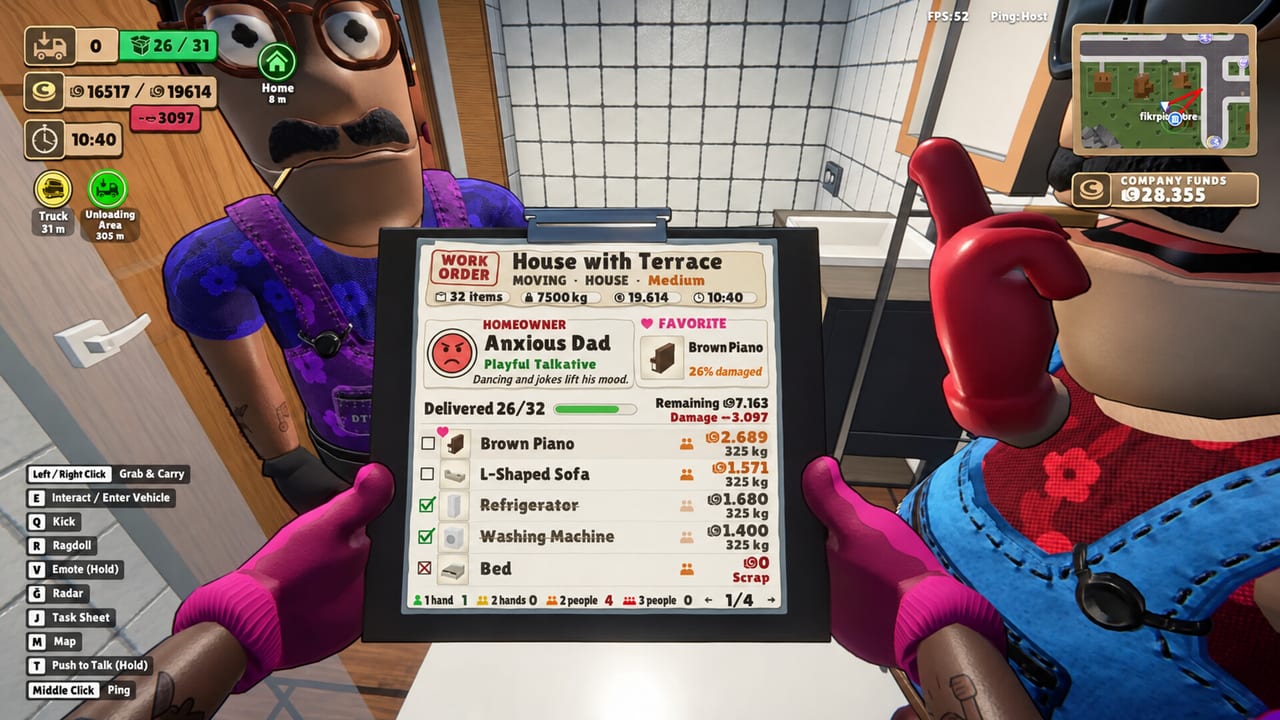
Carry On Together is built around physics grips, tight interiors, and a cargo truck that punishes sloppy inputs. Learning the default demo controls before your first paid job saves furniture, tips, and friendships. This page covers the keyboard and mouse tools documented for the demo, how carrying grips scale with item weight, truck tailgate interaction, controller support on PC, and the HUD tools every crew should assign muscle memory to.
Defaults can change in later patches or after remapping in the options menu. Treat the keys below as the Demo 1.7-era baseline published with the redesigned job sheet, radar, and map, then verify against your in-game controls screen if a new build ships.
Essential keyboard and mouse tools
These are the high-value demo defaults you will use on every contract:
| Action | Default | Why it matters |
|---|---|---|
| Job sheet | J | Opens the redesigned job overview so the crew shares the same task list. |
| Radar | X | Quick spatial awareness when furniture or teammates leave your line of sight. |
| Map | M | Wider navigation for town routes between pickup and delivery. |
| Ping | Middle mouse button | Marks a spot for the whole crew without a long voice explanation. |
| Tailgate / truck interact | E (at the truck) | Slides items through the tailgate; hold can force the gate closed when needed. |
Open J at the start of every job and again whenever someone asks “what is left?” The sheet exists so you are not relying on memory while a homeowner watches you bump their favorite lamp.
Use X when a heavy two-player carry turns a corner and the rear lifter loses sight of the lead. Use M when the truck is loaded and the driver needs the route, not when you are halfway up a staircase with a fridge.
Middle-mouse ping is the fastest co-op callout in the demo. Ping stuck door frames, stair edges that shred sofas, elevator doors, and the exact truck bay you want filled next. Pair pings with short voice cues (“hold,” “lift,” “set down”) instead of paragraphs.
At the truck, stand where the tailgate interaction is available and press E to move cargo through. When the gate needs to be forced shut after a messy load, use the hold interaction rather than assuming a tap always finishes the job. Bad gate timing is how boxes become road debris on the first left turn.
Movement, looking, and sprint habits
Standard first-person style movement applies: move with the usual WASD cluster, look with the mouse, and sprint when a client is impatient or you need to reset a failed approach. The in-game tutorial framing (also shown in community demo videos) emphasizes learning to walk and look before you grab — “mover’s eyes” matter because corridors, elevator frames, and garden gates are the real bosses.
Do not sprint while two players are mid-lift unless the crew explicitly agrees. Sudden acceleration is a common way to clip a door jamb and tank the tip.
Carrying grips: light versus heavy
Carry On Together separates casual one-hand grabs from committed two-hand lifts:
- Light items (small boxes and similar) can often be handled with a single-hand grip. One trigger or the matching keyboard grab is enough.
- Heavier furniture expects a two-hand grip — both triggers together on a controller, or the dual-hand grab on keyboard/mouse — so you protect the “mover’s back” fantasy and keep the physics stable.
- Team lifts require two or more players to grip the same heavy piece and move in sync. Couches, fridges, pianos, and oversized crates are the classic examples from the store pitch.
Before every heavy lift, call the plan: who is lead, who is rear, which doorway you aim for, and where you will set down if the angle fails. If the grip feels wrong, set the item down cleanly instead of fighting the physics into a wall. Demo patches specifically chased bugs where items launched, jittered, or clipped characters during two-player carries — still play as if a bad angle can yeet a wardrobe.
For deeper corridor, stair, elevator, and equipment tactics, continue in How to Carry Together.
Truck controls and cargo discipline
Driving uses the same input device you chose for on-foot play. The dangerous part is rarely the throttle — it is cargo physics after a sharp steer. Assign a driver who understands that a full bed behaves like a loosely strapped trailer from a slapstick film.
Before you roll:
- Confirm the tailgate state with E / hold as needed.
- Ping any unsecured piece that still sticks out of the bay.
- Tell passengers not to yank the driver out of the seat as a joke — earlier demo fixes addressed truck launches when entering, exiting, or pulling the driver through the door, but pranks still waste time and can reshuffle cargo.
Road-specific habits live in Driving Tips.
Xbox and PlayStation controllers on PC
Steam lists full controller support for Xbox and PlayStation pads on the PC build. That means gamepads connected to the PC client, not a confirmed console release. Many Demo 1.7 notes called out broader gamepad improvements, so if you last tried an early demo build with awkward menus, retest after updating.
Typical pad advantages in this genre:
- Analog movement helps inch a sofa through a door without binary WASD stutter.
- Dual triggers map cleanly to one-hand versus two-hand grips.
- Sitting on a couch with friends matches the party-game energy of online co-op nights.
Keyboard and mouse still excel at precise ping clicks and quick J / X / M taps. Mixed lobbies work fine: one player on pad, one on mouse is normal.
Open the in-game controls or options screen to confirm your layout, graphics presets, and FOV. Demo 1.7 added graphics presets, an FOV setting, and general FPS work — useful if camera comfort affects how well you judge furniture clearance.
Emotes and social flair
Party movers lean on quick social signals between serious lifts. Use the in-game emote or expression wheel from your current controls menu rather than memorizing a key from an outdated screenshot — bindings can differ between keyboard and pad, and patch notes emphasize gameplay tools more than vanity hotkeys. Emotes are for celebrating a clean elevator fit or apologizing after you yeet Easygoing Uncle’s favorite chair; they are not a substitute for pinging the next hazard.
Keep emote spam out of active two-player carries. A dance break on the stairs is how tips disappear.
Suggested binding practice routine
Spend ten minutes in the Warehouse training area (see Getting Started) and force yourself to use the tools:
- Open J, close it, open it again while walking.
- Toggle X and M until the muscle memory is boring.
- Middle-mouse ping three corners of the training floor for a partner.
- Grab a light box one-handed, then a heavier prop two-handed.
- Roll the pallet jack, place an inflatable mat or trampoline if you bought equipment, and practice a controlled drop.
- At a truck, cycle E tailgate open/close and slide one crate in and out.
When that loop is automatic, your first homeowner job becomes about geometry and teamwork instead of hunting the key that opens the job sheet.
Common control mistakes
- Never opening the job sheet and arguing about remaining items while the client watches.
- No pings on the exact door frame that keeps clipping the fridge.
- One-handing a heavy piece because “it looked light,” then watching it buck into a wall.
- Driving off with the tailgate wrong after a tap instead of a hold close.
- Remapping in a hurry mid-job and losing sprint or grab under pressure — change binds in the menu before the contract starts.
Master these defaults, then specialize with the carrying and driving guides. Controls will not carry a piano alone — but bad controls will drop it every time.
Frequently Asked Questions
Quick answers for movers, drivers, and co-op crews.
What does J / X / M do in the demo?
J opens the job sheet, X toggles radar, and M opens the map. Demo 1.7 redesigned all three as core HUD tools.
How do I ping teammates?
Use the middle mouse button by default to place a ping the whole crew can see.
How does the truck tailgate work?
At the truck, press E to slide items through the tailgate. Hold the interaction when you need to force the gate closed.
Are Xbox and PlayStation controllers supported?
Yes on PC. Steam lists full Xbox and PlayStation controller support for the computer version; that is not the same as a confirmed console release.
Where should I practice grips safely?
Use the Warehouse training area covered in Getting Started, then apply the same grips on live jobs with the How to Carry Together guide.